

Features / Ad resizer
Updated
Ad resizer: one ad in every platform's size
Turn an ad you already have into each platform's size: Adapt crops it where the shape is close, and extends the picture with AI where a crop would lose too much. Make a new ad in every size you pick, and each one is laid out for its own frame.

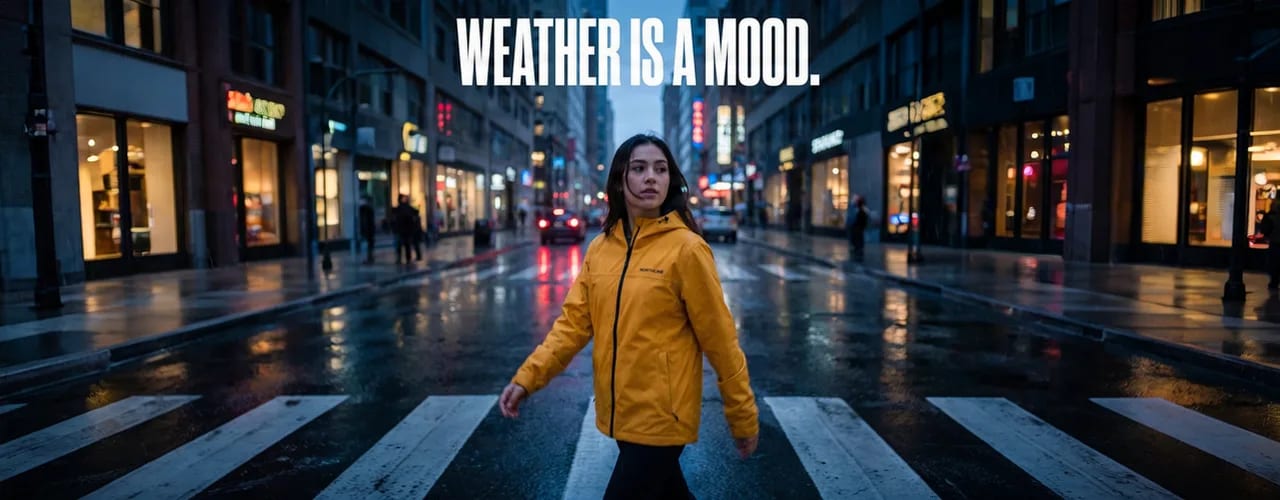
Samples for fictional brands. The marlo video ad was made in Terrads; the northline header was widened from a feed ad with AI in a test, to show what extending looks like; it is not one of Adapt's sizes, and its person and street are AI-generated.
How it works
- 01
Open Adapt
Upload an ad, or pick one from Creatives.
- 02
Pick the sizes
Tick the formats you need, platform by platform. The ones marked AI have the picture extended to fit.
- 03
Download each one
Each size is saved as its own image, linked to the original.
- 16 sizes across 7 platforms
- Cropped where the shape is close, extended with AI where a crop would lose too much
- Sizes made in a batch are composed for their own frame
- Each size is its own file
- For video, Adapt is free
Or make every size in one run
Sizes you pick in a batch are each laid out for their own frame, video too, and Add a size makes one more size of every ad in it.
- Shape
- 1:1
- Length
- 15 s
- What it is
- Video ad, made in Terrads
- Shape
- 9:16
- Length
- 15 s
- This loop
- skips 3 s of it
- What it is
- The same ad, laid out for the tall frame
What extending looks like
When a crop would lose too much of an ad, the picture is extended instead: the new area is drawn by AI to match. This 4:5 ad was widened to a 3:1 header in a test, to show the idea; it is trimmed at the sides here.
- Size
- 1280 × 500
- What it is
- A 4:5 ad widened to a 3:1 header in a test; the new area is AI-made
Every size Adapt makes
The ones marked AI in the app have the picture extended to fit; the rest are cropped. A video is always cropped.
| Platform | Size | Pixels | Ratio | Image or video |
|---|---|---|---|---|
| Meta | Feed | 1440 × 1800 | 4:5 | Both |
| Story / Reels | 1080 × 1920 | 9:16 | Both | |
| Carousel | 1080 × 1080 | 1:1 | Both | |
| Right Column | 1200 × 628 | 1.91:1 | Image | |
| Display Square | 1200 × 1200 | 1:1 | Image | |
| Display Landscape | 1200 × 628 | 1.91:1 | Image | |
| Display Banner | 728 × 90 | 8.09:1 | Image | |
| Display Skyscraper | 160 × 600 | 1:3.75 | Image | |
| Display Rectangle | 300 × 250 | 6:5 | Image | |
| TikTok | Feed | 1080 × 1920 | 9:16 | Both |
| Sponsored Post | 1200 × 628 | 1.91:1 | Image | |
| Vertical | 720 × 900 | 4:5 | Both | |
| Landscape | 1920 × 1080 | 16:9 | Video | |
| YouTube | Display | 1280 × 720 | 16:9 | Both |
| X | Feed | 1920 × 1080 | 16:9 | Both |
| Standard Pin | 1000 × 1500 | 2:3 | Both |
Frequently asked questions
Is it just cropping?
Where the new shape is close to the old one, Adapt crops, and that is free. Where a crop would lose too much of the picture, it extends the picture with AI instead, so the product stays whole; those sizes are marked AI in the app.
Which sizes can it make?
16 sizes across 7 platforms, from Meta's feed and Story / Reels to a TikTok feed ad and a Pinterest pin; the full list is on this page. Each platform's figures are on our ad specs pages.
Can I resize an ad I made somewhere else?
Yes. Upload the image to Adapt, or paste or drop it in. Each size is saved as its own image, linked to the original.
Does it resize video?
Yes, by cropping it: Adapt crops a video to each platform's shape and never extends it, and if a format has a shorter length limit than your video, Auto-trim cuts it to fit. Each copy is saved as its own video, for free.
What does it cost?
The price shows before you start: a size that is cropped is free, and one extended with AI costs credits. Adapting a video is free.
The specs behind it
Free tools
Related reading
More features
Resize an ad
Open an ad in Adapt and tick the sizes you need. Each one is saved as its own file, linked to the original.
New here? You'll sign in and set up your brand once first. Making ads needs a paid plan.